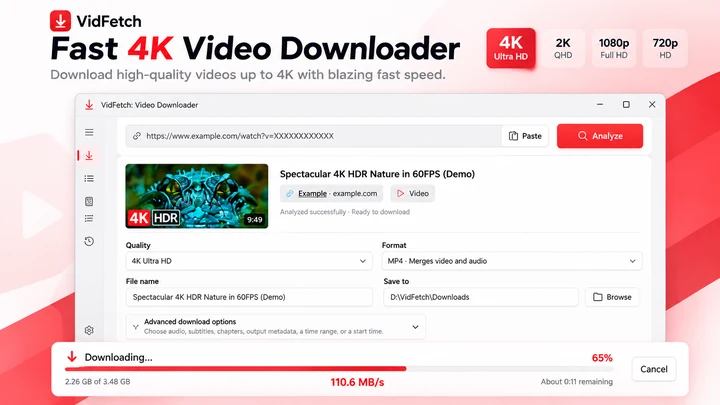

保存支持的在线视频,提供明确的清晰度选项、播放列表、多链接下载、队列、重试和本地历史记录。

媒体
Video Downloader 4K & Converter Pro
适用于 Windows 的视频下载器与媒体工具箱。
Windows 应用。价格和系统要求请见 Microsoft Store。
要点一览
查看官方商店页面认识 Video Downloader 4K & Converter Pro
QUICKMEDIA:适用于 WINDOWS 的视频下载器与媒体工具箱
下载视频、保存播放列表、管理多个媒体链接,并在单个 Windows 应用程序中处理下载的文件。QuickMedia 将视频下载器与实用的 Media Studio 结合,支持视频转换、压缩、裁剪、提取 MP3 音频、生成 GIF、捕捉单帧以及本地播放。无论您是在收集允许使用的视频资源、整理录像、为项目准备内容,还是缩小大型媒体文件,QuickMedia 都能帮助您从下载无缝过渡到编辑,无需在多个应用之间切换。
WINDOWS 11 视频下载器
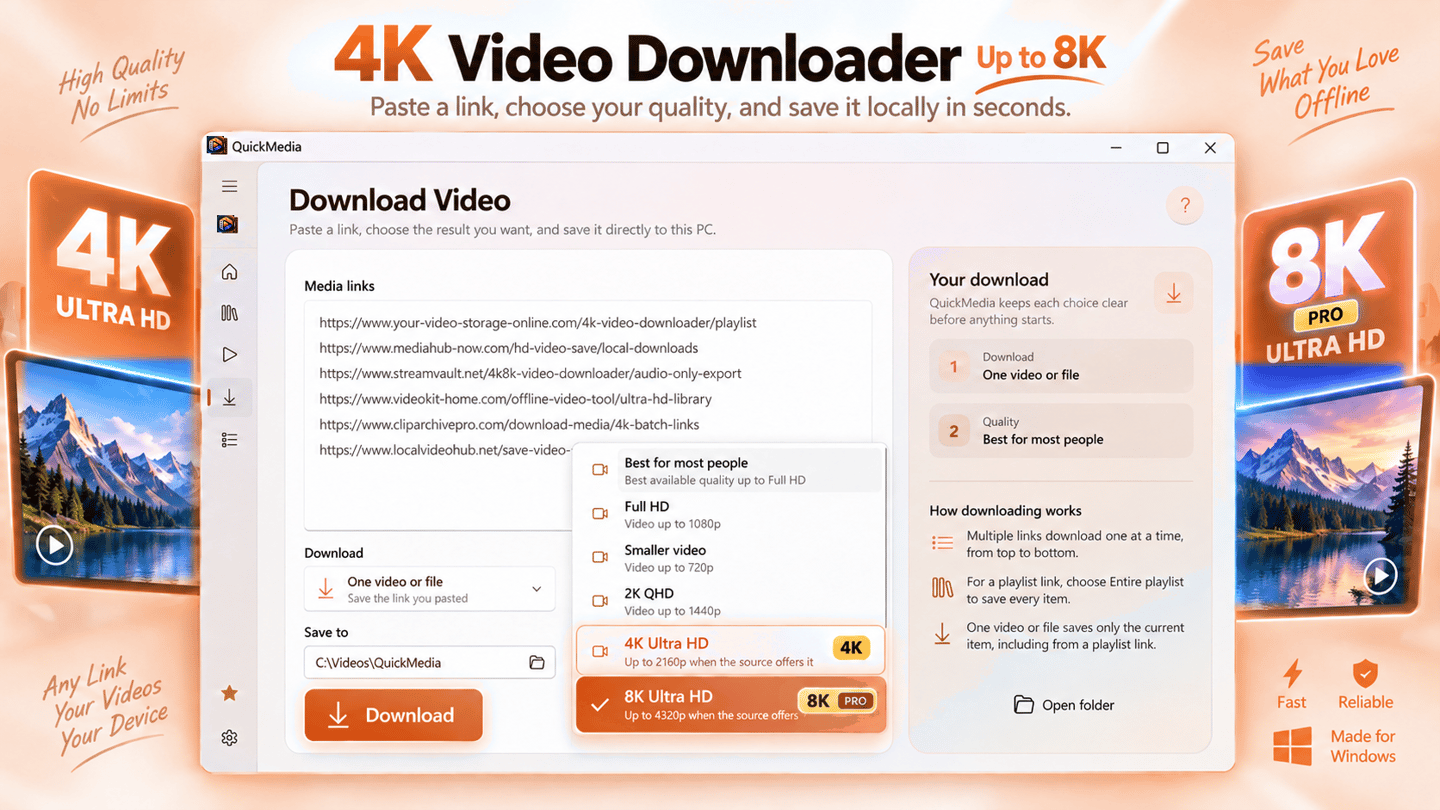
QuickMedia 旨在让 Windows PC 上的视频下载变得更加简单直观。粘贴支持的媒体链接,查看下载设置,选择目标文件夹,即可开始将文件保存至本地。界面会显示下载进度、传输速度、文件大小和其他状态信息,让您全面掌握整个过程。
QuickMedia 支持从兼容的在线视频源进行下载。网站兼容性和可用格式有所不同,部分链接可能需要访问权限或不支持下载。QuickMedia 不会绕过 DRM 或限制性访问控制。
在可用时下载 4K 和 8K 视频
当原始视频源提供相应格式时,可将高分辨率视频保存到电脑。QuickMedia 支持清晰度选择,在源文件支持的情况下,最高可达 4K 和 8K。
较高的分辨率并不总是适合所有任务。Full HD 文件可能更易于存储和分享,而 4K 或 8K 则在源文件提供更多视觉细节时非常有用。请根据您的存储空间、播放设备和用途选择合适的清晰度。
实际下载质量取决于源视频、可用流和应用功能。如果源视频仅提供 1080p,选择 8K 并不能生成真正的 8K 画质。高级高分辨率选项可在 QuickMedia Pro 中使用。
针对多个链接的批量视频下载器
无需再为每个视频重复相同的下载步骤。QuickMedia 提供了多链接工作流,允许您一次性输入多个媒体 URL,审核链接并将其整理到下载队列中。
将链接粘贴在不同行上,配置首选下载设置,并监控每个任务的进度。这对于收集授权的培训视频、项目资源、录音/录像以及其他如手动逐个下载将十分繁琐的媒体文件非常有用。
批量下载将多个任务整合到一个工作流中。它不能保证每个链接都能成功下载,且同时传输的数量取决于可用功能和设置。多链接下载属于高级 Pro 工作流的一部分。
播放列表下载与视频集
QuickMedia 可以帮助保存支持的视频播放列表,无需手动打开和处理每个单独的项目。当处理在一个来源下整理的录音、课程或个人媒体集时,播放列表支持尤为实用。
使用 Pro 版本,可以在应用限制范围内处理支持的播放列表,包含最多 100 个项目。可供下载的视频和格式取决于源头。私密、不可用、受受限及不支持的播放列表项目可能无法下载。
下载队列、进度与传输控制
在一个整洁的工作区中追踪正在进行的下载。QuickMedia 呈现可用的进度信息、传输速度、下载状态和文件详情,帮助您直观了解哪些任务正在运行、哪些需要注意。
当您需要中断下载或排查临时问题时,暂停和恢复控制有助于管理支持的传输。成功恢复取决于服务器、媒体源以及是否存在有效的下载 URL。
对于较大的下载任务,跟踪单个任务比盲目启动尽可能多的传输更为实用。QuickMedia 帮助您将下载活动透明化,而不是让用户去猜测文件去向或传输是否完成。
本地媒体文件的视频转换器
下载视频往往只是第一步。在分享录像、导入到其他应用程序或在特定设备上播放之前,您可能需要不同的格式。
QuickMedia 在 Media Studio 中内置了本地视频转换工具。打开支持的媒体文件,配置可用的输出选项,即可为您预期的用途创建转换后的副本。
转换可以提高支持格式之间的兼容性,但无法恢复原始视频中缺失的细节。输出质量和处理时间取决于源文件、选择的设置和电脑性能。
压缩大型视频并节省存储空间
高分辨率视频会占用大量磁盘空间,尤其是处理长录像或多个文件时。QuickMedia 包含视频压缩工具,可帮助缩小支持的本地媒体的文件体积。
在准备要分享、归档或存储在可用空间有限的设备上的视频时使用压缩。不同的压缩设置在视觉质量、处理时间和输出体积之间提供不同的权衡。
对于重要文件,请保留原件,直到检查完压缩后的效果。较小的输出文件可能会丢失一些视觉细节,特别是在选择激进的压缩设置时。
从视频中提取 MP3 音频
需要视频中的音频而无需保留完整画面?QuickMedia 包含针对支持媒体文件的本地 MP3 提取工具。
从您自己的访谈、录音、讲座或其他授权内容中提取音频并另存为单独的文件。纯音频副本对于收听、复习口述内容或整理无需视频播放的录像更为方便。
音频提取不会提高原始音轨的质量。结果取决于源音频和可用的处理选项。
剪辑视频片段,无需复杂的编辑流程
有时您只需要长录像中的一短截。QuickMedia 为支持的视频文件提供了裁剪工具,以便您可以移除不必要的部分并准备一份更聚焦的片段。
这对于提取演示、保留录像中的精选时刻或准备要分享的较短文件非常有用。在删除或替换原件之前,请检查生成的片段。
快速裁剪适用于简单明了的媒体任务,而非复杂的时序编辑、特效或专业后期制作。
创建 GIF 并捕捉视频单帧
QuickMedia 还包含用于从支持的视频文件中创建 GIF 和捕捉静止单帧的工具。
将合适的短片段转换为动态 GIF 以用于演示或视觉参考。当您需要录像中的静止图像时(例如教程插图、演示文稿素材或项目参考),可以捕捉单个帧。
这些工具让您能够更轻松地从已有媒体中准备轻量化视觉素材,而无需为每一个小任务都打开单独的编辑器。
批量媒体处理与离线播放
Media Studio 支持涉及多个本地文件的工作流,帮助用户在所选操作支持的情况下整理重复的转换和处理任务。
QuickMedia 还为支持的媒体格式提供离线播放功能,方便您在下载或处理后查看已保存的文件。
将下载、基本媒体编辑和播放集成在同一个应用中,有助于减少不必要的工具切换。您的媒体文件仍保存在您选择的文件夹中,可以通过 Windows 资源管理器和其他兼容应用进行访问。
免费视频下载与可选 Pro 功能
QuickMedia 为单个视频下载提供了一个免费的起点,包含在源文件支持且可用时的 Full HD 清晰度。
QuickMedia Pro 扩展了工作流,支持高达 4K 和 8K(可用时)的高质量下载、多链接下载以及最多 100 个项目的支持播放列表下载。高级功能受限于安装的应用版本的能力和限制。
您可以从简单的下载工作流开始,然后决定额外的 Pro 功能是否符合您的需求。可用的方案、价格和购买条件均在应用内和 Microsoft Store 中显示。
本地媒体工作流与负责任的下载
QuickMedia 专为喜欢在自己电脑上保存和管理媒体的 Windows 用户设计。下载的文件保存在本地,Media Studio 提供了处理支持的本地媒体的工具。
请仅将 QuickMedia 用于您拥有的内容或已获授权下载与处理的内容。本应用不会绕过 DRM、付费墙、身份验证要求或受保护内容限制。下载行为亦受适用的版权法规、许可协议和源条款的约束。
一款集视频下载与媒体工具于一身的 WINDOWS 应用 QuickMedia 汇集了围绕下载视频经常需要进行的操作:收集媒体链接、选择质量、监控下载、保存文件、提取音频、转换格式、压缩录像、裁剪片段、创建 GIF、捕捉单帧以及查看结果。 对于想要不仅仅是独立视频下载器的 Windows 用户,QuickMedia 提供了一个从保存原始媒体到为下一次使用准备文件的连贯工作流。
最新功能、系统要求、支持的语言和购买选项,请以 Microsoft Store 页面为准。
常见问题
Video Downloader 4K & Converter Pro 是 SteveShines 推出的 Windows 应用,属于“媒体”类别。适用于 Windows 的视频下载器与媒体工具箱。
Video Downloader 4K & Converter Pro 的主要功能:从支持的网站下载视频;保存 Full HD (1080p) 视频;使用 Pro 在可用时下载 4K 和 8K 视频;选择可用的视频清晰度和分辨率;使用 Pro 批量下载多个视频链接;使用 Pro 下载支持的播放列表;使用 Pro 保存最多包含 100 个视频的播放列表;在井然有序的队列中管理下载;追踪下载进度和传输速度;暂停与恢复支持的下载;选择自定义视频下载文件夹;在支持的格式之间转换视频;压缩大型视频以缩小文件体积;从本地视频提取 MP3 音频;将视频裁剪为更短的片段;从视频片段创建动态 GIF;从视频帧捕捉静止图像;批量处理支持的本地媒体文件;离线播放已下载的视频;将下载和处理后的文件保存在本地。
Video Downloader 4K & Converter Pro 可在 Windows 11、Windows x64和Windows ARM64 电脑上运行。完整的系统要求请见 Microsoft Store 页面。
Video Downloader 4K & Converter Pro 提供以下语言:English, German, Spanish, French, Indonesian, Italian, Japanese, Korean,以及另外 8 种。
请从 Video Downloader 4K & Converter Pro 的官方 Microsoft Store 页面(https://apps.microsoft.com/detail/9NS671FB16L7)安装。安装和更新由 Microsoft Store 负责,页面上会显示当前的价格和购买选项。
Video Downloader 4K & Converter Pro 由 SteveShines 开发和发布。SteveShines 专为文件、媒体、创意工作和桌面效率打造 Windows 应用。如需帮助,请访问 https://steveshines.com/zh-cn/contact/。
在浏览器中运行,不会上传任何文件。
保存支持的在线视频,提供明确的清晰度选项、播放列表、多链接下载、队列、重试和本地历史记录。
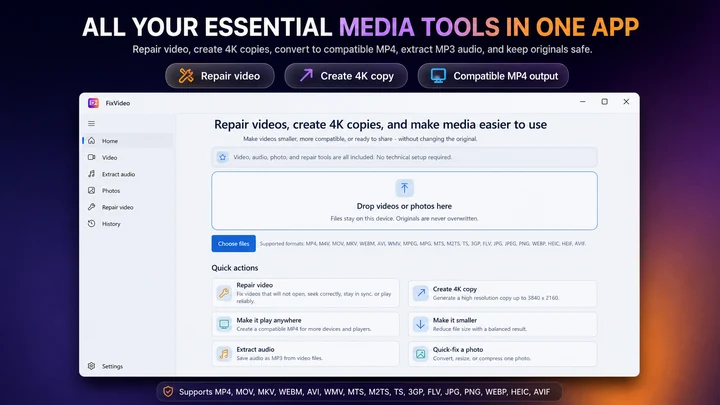

FixVideo 是适用于 Windows 的离线视频修复、压缩与转换工具箱。修复支持的播放问题,压缩 4K 和 HD 录像,将视频转换为 MP4,提取 MP3 音频,并在无需上传个人文件的情况下批量优化照片。
桌面编辑器中的视频裁剪、消除静音和 Whisper 字幕功能。
Tutorials
Learn how to download multiple videos on Windows 11, manage batch download queues, choose available video quality, and troubleshoot common issues.
Troubleshooting
Troubleshoot failed video downloads on Windows 11, from unrecognized URLs and permission errors to interrupted transfers, storage issues, and batch download problems.
Video & streaming
M3U8 Downloader for Windows 11: Save HLS Video Streams
Video Downloader & streaming
Save a supported M3U8 stream as a locally usable video, preferably MP4
Video Downloader & streaming
Record compatible livestreams you are authorized to save, track download activity, and keep recordings locally on your Windows PC. Copy summary
Windows apps
Paste supported MP4, MP3, M3U8 and other media links into one Windows downloader to manage files, recordings, and local history.
Troubleshooting
Learn why a video downloader may show 1080p instead of 4K or 8K, and how to check source quality, formats, access limits, and saved file resolution.
Video & streaming
Understand MPEG-DASH MPD manifests, save supported streams on Windows 11, and troubleshoot missing audio, expired links, and DRM restrictions.
Workflow guide
A practical Windows 11 workflow for taking an authorized video from download through format checks, repair or conversion, editing, subtitles, final export, and upload.
Video Downloader & streaming
An M3U8 file is a UTF-8 text playlist used by HLS streaming. Learn how master and media playlists work, why an M3U8 is not an MP4, and how to save a supported stream on Windows.
Video Downloader & streaming
HLS and MPEG-DASH both adapt video quality over HTTP, but use different manifests and playback ecosystems. Compare M3U8 and MPD, codecs, CMAF, compatibility, latency and saving supported streams on Windows.
Video Downloader & streaming
Downloaded a .ts file instead of an MP4? Learn why HLS video arrives in MPEG-TS segments, how to tell a complete recording from one short segment, and when remuxing to MP4 is possible.
Subtitles & video
Compare SRT and WebVTT subtitle formats, see examples, understand what is lost in conversion, and learn to batch-convert privately in your browser.
Explainer
Compare automatic captions with creator-edited subtitles: accuracy, timing, accessibility, SRT files and a practical Windows 11 workflow.
Explainer
Learn the difference between burned-in captions, selectable subtitle tracks and separate SRT/VTT files—and which format to use for sharing or uploading videos.
Explainer
Video downloaded but won’t open, shows a black screen or plays without sound? Check incomplete files, MP4 codecs and format compatibility before converting.
Explainer
Fix a sideways or upside-down phone video on Windows 11. Learn rotation metadata, Clipchamp steps, aspect ratio and when to export a new MP4.
Technology explained
An MPD file is the XML manifest of an MPEG-DASH video stream: a map of the tracks, qualities and segments a player downloads. See what is inside one, why it will not play alone, and how to check or save a DASH stream on Windows.
Technology explained
ASS is a styled subtitle format with fonts, colours, positions and effects. See what is inside an ASS file, how it differs from SRT, why many players ignore it, and what changes when you convert it.
Technology explained
Drop-frame timecode skips frame numbers, not frames, so 29.97 fps video keeps clock time. See why it exists, how the rule works, when to use drop-frame or non-drop, and how to convert timecode.
Explainer
Learn how to search for text inside PDF and Word documents on Windows 11, troubleshoot indexing, and find files by content.
Workflow guide
Find an old document even when you have forgotten its filename. Search by phrases, invoice numbers or document contents.